
A few weeks ago, I embarked upon a journey of creating my own desktop environment in pure Assembly. A tiling window manager, a terminal, a shell with nothing between my keystrokes and the kernel, all in x86_64 assembly, no libc, the whole desktop measured in kilobytes.
Then I replaced my main tools with my own Rust equivalents. An email and messaging center, a new text editor, a calendar, a Spotify player, an astronomy program, and many more. One by one, the tools I depend on became tools I control. The tools fit me. I no longer have to adapt to other people’s tools.
A few days ago I looked at what I still used that was not under my complete control. Two things remained: Firefox and LibreOffice. Firefox is a mountain to replace. But LibreOffice? That was doable. I now have a system that effectively replaces my use of LibreOffice, or any other office suite.
One viewer to rule them all
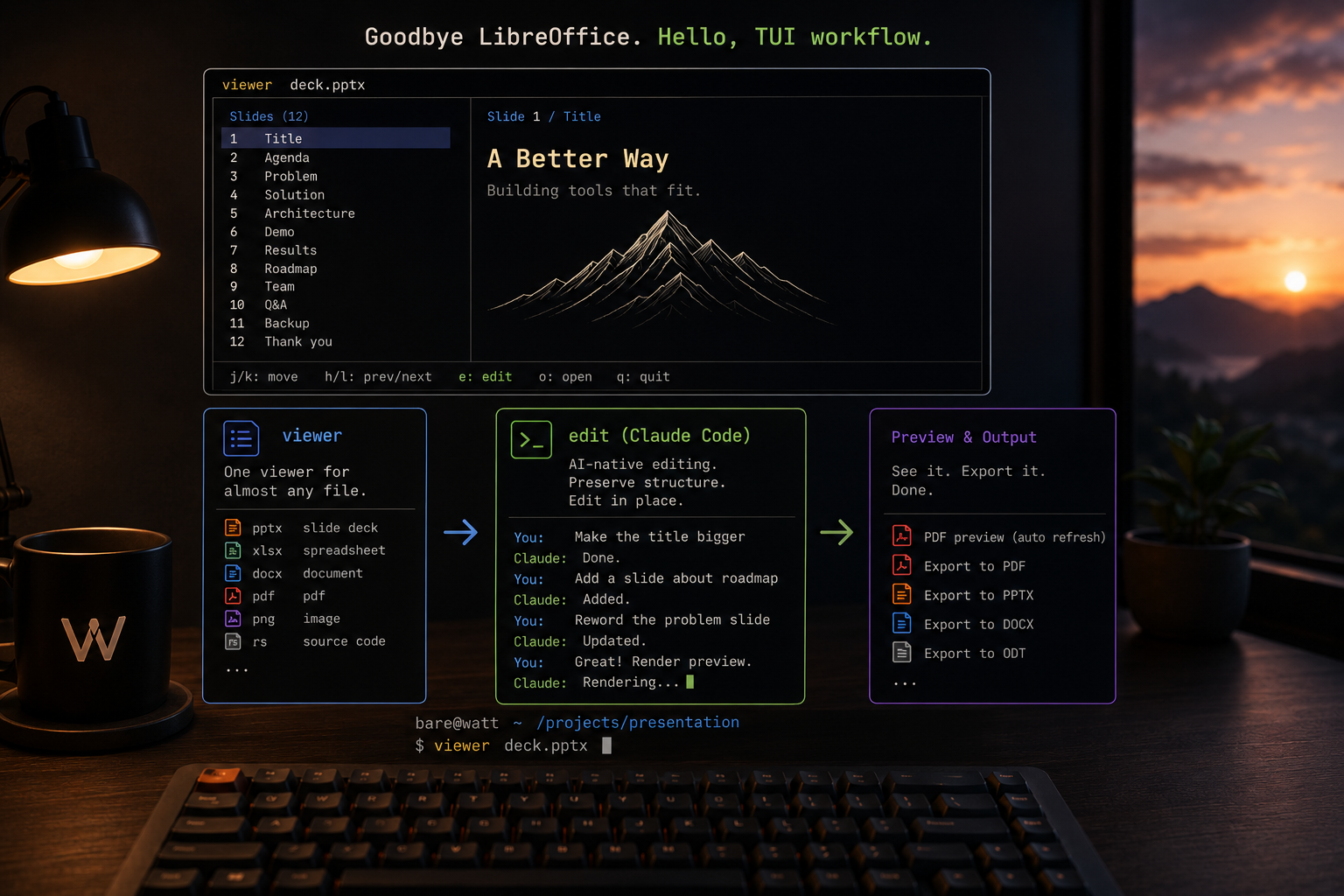
The centerpiece is viewer. Point it at almost any file, a spreadsheet, a document, a slide deck, a PDF, an image, source code, and it renders a clean read-only preview right in the terminal. Tables as aligned columns, documents as flowing text, slide decks as a per-slide outline, images inline. It detects the type and picks the right method, all driven by a small config table. Teaching it a new extension is one line…. no need for a recompile.
Viewing is half the job. The other half is editing, the bridge to an office suite. From the preview, one key hands the file to the right editor. Spreadsheets open in grid, my AI-native terminal spreadsheet with a real formula engine, cell colors, and CSV/xlsx/ods support. Text and Markdown open in scribe, the editor I keep growing in two-minute iterations. Etc.
I don’t need to open an office GUI. Where a binary format genuinely needs muscle, LibreOffice still runs, but headless and invisible, a silent converter rather than an application I look at. The interface is mine; the format plumbing is borrowed quietly in the background.
AI as the editing layer
The interesting part is editing the formats that have no business being edited as plain text: PowerPoint, Word, Excel, PDF. In viewer, I press one key to open an integrated Claude Code session seeded with the file. A matching skill activates by type and edits the document in place, preserving its layout. I describe what I want, and the deck or the document changes, structure intact.
Color is also handled. In scribe I select text, press a key, and prism (my color picker) opens to set foreground and background. The color lives in the text as a small HTML span, so it shows live while I write. And it survives export. Scribe writes straight to docx and odt with the colors, highlights, and font sizes intact, and to PDF as well.
A practical example
Here is a workflow that, a month ago, would have meant opening Impress. It’s smoother now.
I want a presentation, based on a template. I run viewer template.pptx, press edit, and start talking with Claude. We build the deck together. Now and then I want to see how it actually looks, so the editor re-renders the deck to a PDF after each change, and a single zathura window on the next workspace reloads it automatically. I keep talking; the preview keeps updating. The slides take shape on one screen while the conversation happens on the other.
No office suite was opened. No mouse was involved. I work in the terminal whenever I can. TUI rules.
Why bother
The same reason as the assembly desktop and the Rust tools before it. I would rather understand the things I use every day than rent them. Each replacement is smaller, faster, and lighter on the battery than the thing it replaced, and every one of them is mine to change and control. It all rolls up into Watt, the lean desktop project.
The office suite was the last big holdout that fell. Firefox is still standing.
For now.