
Three shells. Three languages. One obsession with going deeper. And faster.
I started with hand-crafting rsh. Written in Ruby over a few years. Now 4,048 lines, full-featured, comfortable, slow. 300 millisecond startup. Fine for a scripting language, frustrating when I open lots of terminals in quick succession.
Then I decided to rush to the next level. Rewriting rsh in Rust. Rush has 4,280 lines, same feature set, 26 millisecond startup. Part of the Fe2O3 suite of Rust terminal tools. Fast, but still loading a runtime, linking against libc, initializing a memory allocator.
The question became, “what if there was nothing between my keystrokes and the kernel?”
bare
bare is an interactive shell written entirely in x86_64 Linux assembly.
While I have written my fair share of assembly through the years (even raw hex coding), my projects have mainly been on the coconut processor, and never on x86. In just 4 evenings with maybe 6 hours total of coding with Claude Code, bare became my login shell.
This shell has no libc, no runtime, no dynamic linking. Pure syscalls. The binary is 126KB and starts in 8 microseconds.
$ ./bare --bench
bare startup: 8 microseconds
The numbers
| rsh (Ruby) | rush (Rust) | bare (Assembly) | |
|---|---|---|---|
| Language | Ruby | Rust | x86_64 ASM |
| Source lines | 4,048 | 4,280 | 13,366 |
| Binary size | ~15MB (interpreter) | 2.6MB | 126KB |
| Dependencies | Ruby runtime | libc, 8 crates | none |
| Startup | ~300ms | ~26ms | 8µs |
| Dynamic linking | Yes | Yes | No |
bare is 3.4x faster than bash on per-invocation CPU time and 27x faster than rush. The binary is 21x smaller than rush.
What you get
bare is now my daily login shell. It has:
- Dynamic prompt with git dirty indicator (green/red dot, no fork needed)
- Multi-pipe, redirections, command chaining, background jobs
- Command substitution
$(cmd), brace expansion{a,b,c}, globs[a-z] - Nick aliases, global aliases, abbreviations (expand on space)
- Interactive tab completion with LS_COLORS and cycling
- Ctrl-R history search, inline suggestions, prefix filtering with Up/Down
- Alt-F/Alt-B word movement
- Job control (Ctrl-Z, fg, bg)
- 6 color themes, 18 configurable colors
- Syntax highlighting while you type
- Config file auto-saved on exit
- Plugin system (any executable in
~/.bare/plugins/) - AI integration via plugins (
:ask,:suggest) timebuiltin,--benchflag- Session save/load, calculator, command stats, validation rules
- Companion TUI configurator: bareconf
Everything is coded with direct kernel interaction. Every read(), every write(), every fork(), execve(), pipe(), dup2(), wait4(), ioctl() is a raw syscall instruction. No wrappers, no abstractions.
The details
The entire shell is one assembly file: bare.asm. NASM syntax. Every feature that other shells delegate to libraries, bare implements from scratch:
- Terminal control: raw mode via
ioctl(TCSETS), character-by-character input - Line editing: cursor positioning with ANSI escape sequences
- Tab completion:
opendir+getdents64syscalls to scan directories - Git branch: reads
.git/HEADdirectly, walks parent directories - Git dirty: compares
stat()mtimes of.git/indexvs ref file - History: file I/O with
open/read/writesyscalls - Job control:
fork,wait4withWUNTRACED, manualSIGSTOP - Config: hand-rolled line parser for
~/.barerc
The BSS section allocates all buffers statically. No heap, malloc or brk. The kernel zero-fills BSS pages on demand.
The journey
Going from Ruby to Rust was about speed. Going from Rust to assembly was about obsession and a dose of nostalgia and seeing what is actually possible with AI coding.
When you write a shell in assembly, you learn exactly what a shell does. There’s no std::process::Command. There’s fork() returning in two processes and you handling both. There’s no crossterm::terminal::enable_raw_mode(). There’s a 60-byte termios struct and an ioctl number.
Every bug teaches you something about Linux. A segfault from writing to the text section. A hang from SIGTTOU when the process group doesn’t own the terminal. A crash from $ being a NASM keyword, not ASCII 36. All of these and more Claude and I had to get and debug.
Try it
git clone https://github.com/isene/bare.git
cd bare
make
sudo make install
Or grab the .deb from the releases page.
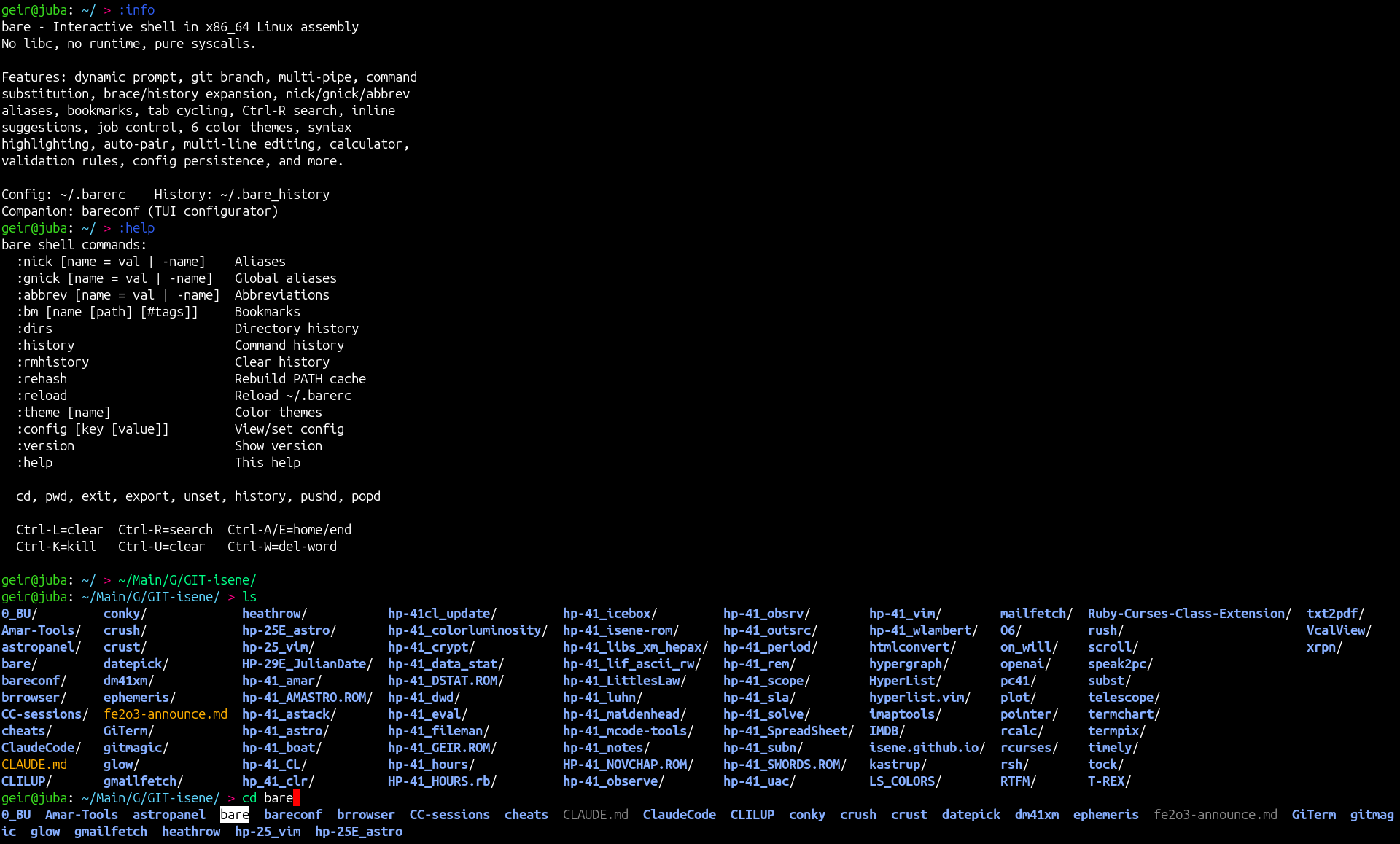
Set it as your terminal shell and feel the difference. You probably don’t need 8 microsecond startup. But there is something satisfying about a shell with nothing between you and the kernel.
CHasm
bare is the first project in the CHasm suite (CHange to ASM). Because sometimes the right answer to “can we make it faster?” is “remove everything.”
Link to this post: https://isene.org/2026/04/Bare.html