Fe2O3
A suite of fast, opinionated terminal tools written in Rust. Single static binaries. Shared TUI foundation. No runtime deps.




A suite of fast, opinionated terminal tools written in Rust. Single static binaries. Shared TUI foundation. No runtime deps.
Rust, the language, was actually named after a family of fungi (Pucciniales, plant pathogens "over-engineered for survival," as Graydon Hoare put it). The iron-oxide association came later, through the visual rhyme with what those fungi look like on a leaf. Fe2O3 is that iron oxide: what happens when iron meets oxygen meets time. These tools are the result of pointing fast iron at the soft corners of a workflow. This is the terminal half of that toolkit.
Every tool sits on crust, a small pane-based TUI library. Colors, borders, scrolling, image rendering, and line wrapping all behave identically everywhere.
No Ruby, no Node, no Python. Drop the binary in ~/bin
and it runs. Startup time is under 50 ms on a warm disk.
Every Fe2O3 tool is a feature port of a long-running Ruby original. Same UX, dramatically faster, and with async fetches so the UI never blocks on network I/O.
glow renders images inline using kitty, sixel, w3m, or, as a graphics-free fallback, colored Unicode braille (works over SSH and in tmux without passthrough). PDFs preview as thumbnails, videos as extracted frames, emails as rendered pictures, astronomy as starcharts.
Fifty-three binaries and eight libraries that together cover most of what a keyboard-bound terminal user does in a day, plus a phone companion that bridges one of those workflows off the laptop.
Every Fe2O3 program on one page, next to the rest of my software: isene.org/software.
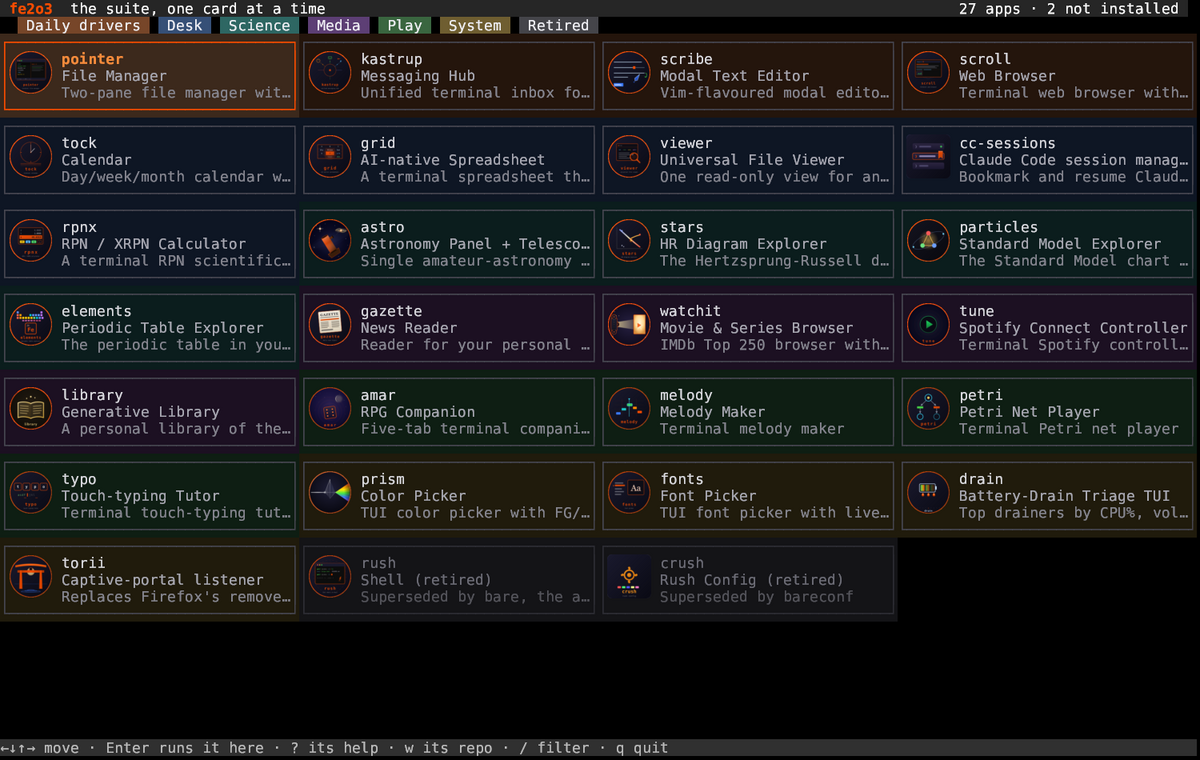
fe2o3 is the suite as a grid of cards: every app with
its logo, what it is, and one line on why. Arrow keys move, Enter
runs it in the same terminal, ? shows that
app's own help, w opens its repo, /
filters.
It is also the installer. What you have has a solid frame and a
green ✓; what you do not have is dashed with an
amber ↓. i fetches the one under the
cursor, I fetches every missing one in view. So one
binary is all you need: take the whole suite, or only the apps
you fancy.
fe2o3       # the grid
fe2o3 -l    # the suite as text
Two-pane file manager with syntax-highlighted previews, inline image + video frame rendering, archive browsing, SSH, async file operations, undo, bookmarks, plugins.
Vim-flavoured modal editor for writers. Soft-wrap, reading mode, spellcheck, persistent registers, Claude Code in the prompt. Native HyperList editing (full hyperlist.vim parity; it replaces the retired hyper).

kastrup, tock and your task list as tabs in one terminal, and a Home tab with your unread mail, the agenda and the tasks over a Claude pane. Ctrl+O goes to the next tab; Ctrl+A takes what is on screen to Claude.
A keyboard-driven browser around the WebKit engine. Tabs group, fold and come back with the session the way Firefox does it. Logins live in one sealed file and fill a login page as it loads. Hints follow links without the mouse. Every site is asked for its dark style, and the ones with none are turned around.
Unified terminal inbox for maildir email, RSS, weechat, Slack, Discord, SMS. Thread view, tagging, search, AI assistant, compose plugins, OSC 8 clickable links.
Day/week/month calendar with ephemeris: sun, moon, planets, astronomical events. Google Calendar + Outlook sync. Desktop notifications. Shared ephemeris engine with nova.

A PDF is two documents in one: the words, and the page they were set on. folio shows either, or both side by side. Text comes out of the text layer, and pages render as real images in the terminal. A scan says so rather than showing you an empty screen. Where a document has its source beside it, a .md or a .tex, one key edits that source, rebuilds the PDF and reloads the page. It also searches every indexed PDF you own, not just the open one. It yanks a page with its citation attached.
Terminal web browser with vim-style keys, tabs, inline images, forms, bookmarks, and AI summaries. Handles mailto links by handing them off to kastrup.

Two people join a room by name and talk. Each end sends twenty milliseconds of Opus while someone is speaking, and nothing at all in the pauses. The camera works the same way. Frames that look like the last one never reach the encoder, so a still scene costs a few hundred bytes. The screen shows what share of the line your voice used. Neither home router accepts a call from outside, so a relay with a real address passes the packets on.

Which session waits for you, on which workspace, with how much context. Enter jumps to it or resumes it in a new glass, and m messages another session. The inbox pane shows what just arrived from the phone or as screenshots.
Claude Code in three panes: the answers, a log of the tools it runs, and a status line. It resumes any session by its bookmark tag, and runs as the Claude pane in gluon.

Bookmark and resume Claude Code sessions with tags: cc / cl pickers with reorder and running indicators, /bm command inside Claude, automatic follow of context continuations.

Hold Mod4+g, say what you want, and let go. Whisper turns the speech into text, Claude picks a workspace, starts an app from your list or answers, and a notification shows what was heard and done. The microphone records only while the key is down.
A terminal RPN scientific calculator in the HP tradition: a live
X/Y/Z/T stack, the full math/trig/log/stats/base command set, and
coloured cycling shift pages (f/g/h). Runs XRPN (HP-41 / FOCAL)
programs. Shares one Rust engine with the RPNx phone app; the scribe
editor drops its result into your text on =.
One read-only view for any file: spreadsheets, documents, slide decks, PDFs, images and syntax-highlighted code. Renders each with the right method and launches the right editor on a keypress. Browses with pointer; new formats are a config line.
A workspace pinned to the external monitor shows its active tab. beam lists what is parked there and shows the one you pick, while your own screen and keyboard stay put.
A terminal spreadsheet that lets the AI do the tedious parts. Edit cells and write formulas, or just tell Claude what to change. Reads and writes csv/xlsx/ods with a hand-rolled formula engine, undo, and multi-sheet workbooks.
Every repo in a folder becomes a star: its size from its lines of code, its colour from its main language, its place on the arm from its first commit. A repo changed this week has spikes, a commit made while galaxy is open makes its star flare, and Enter opens the repo in pointer. Real pixels where the terminal shows images.
Render any .hl as a single self-contained page: folding, live search, jumping references, clickable checkboxes, light and dark, hyperlist.vim colors. The prime example maps the TEG framework at isene.com/freewill/TEG.html.
Feed it a .hl and it draws the structure: states or transitions, four themes, any direction, PNG or SVG or PDF. hl2web embeds its output at the foot of a page.

Single amateur-astronomy app: Sky mode (weather, ephemeris, observation conditions, APOD, starcharts) plus Gear mode (telescopes, eyepieces, recommended combinations, observation logs). Replaces nova and scope.
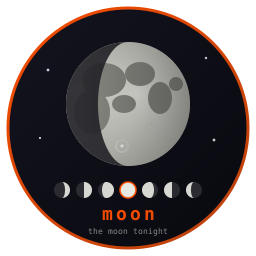
A big Moon from NASA's LRO map, craters and all, lit for the phase of the moment. A strip of small Moons along the bottom shows three days back and the days ahead. Arrows step a day. Tab opens a map to zoom and pan with the seas, craters and mountains named. In glass it is all real pixels through glow.

The Hertzsprung-Russell diagram in the terminal. 461 named stars plotted by temperature and luminosity, walk between them with the arrow keys, schematic evolutionary tracks for 1, 5 and 15 solar masses, and the full Wikipedia article for each star offline.

How far out a planet orbits runs across, and how big it is runs up. Our own eight are drawn in white for scale. Enter unfolds the whole system with the band where water could stay liquid.
Opens on a human body and steps outwards or inwards, thirty-seven rungs from the quantum foam to the web of galaxies. Each rung is a picture of what that scale contains, painted in real pixels where the terminal shows them. A ruler along the bottom marks where you stand, and you are almost exactly halfway.
The Standard Model chart with every particle's PDG numbers and its Wikipedia article, plus a zoom that takes a carbon atom apart in four steps — nucleus, nucleon, quark — as a 3D model you rotate with the arrow keys.

3,386 nuclides from the IAEA table, neutrons across and protons up, coloured by how each one comes apart. Enter follows a decay chain to its stable end: uranium-238 reaches lead-206 in fourteen steps. Press i in elements to land here.
The periodic table in your terminal. All 118 elements plus the hypothesized 119–126, category-colored, with structured properties and the complete Wikipedia article per element, fetched once, then fully offline.

Four glasses, a shelf of reagents and a burner. Colours, precipitates, bubbles, salts left behind when the water boils off, flame tests and the iodine clock. Every reaction runs at a speed set by how crowded it is, so nothing is canned.
Batteries, resistors, capacitors, LEDs, switches and transistors on a grid. Wire them up and power on. Wires glow with voltage, LEDs light with their current, and an LED without a resistor burns out. Then logic chips: gates, a clock, a counter, a digit display and the 555 timer. Challenges teach one idea at a time, from lighting an LED to a stopwatch.
Five pictures of one idea: repeat something simple and watch what it settles into. Zoom the Mandelbrot set, or step into the Julia set of the point you are standing on. Turn the knob on a Lorenz attractor until the butterfly collapses.

Reader for your personal daily news digest. A server-side Claude run gathers the news you care about into a dated Markdown issue (and a typeset PDF); gazette browses the last 7 days and opens source links in scroll.

IMDb Top 250 browser with inline posters, TMDb streaming info, wish/dump lists, genre filters, async background fetching. Cut search time so you spend time watching.
Spotify in the terminal: search, playlists, saved tracks, the queue and every playback key, played by tune itself or by any Spotify Connect device. It also plays the music files on your computer, and internet radio from a directory of tens of thousands of stations, through mpv.
Terminal melody maker. Play a piano line live on the keyboard, record and edit it on a piano-roll, keep time with the metronome, then export to WAV as the starting point for a song.

A personal library of the books that should exist. Curate a shelf of enticing titles; grab one and Claude writes the whole book, with inline figures, to read in the terminal or hear read aloud while the text follows the voice. Real books fetch from legal sources. Syncs to the phone reader, books.
Five-tab terminal companion for the Amar RPG, a 3-tier d6 system. NPC / encounter / town / weather forge, persistent campaign tracker with adventure import + inline scene images, live combat HUD, browsable canon (187 wiki entries scraped from d6gaming.org), and AI-assisted Inspire prompts.

The games on funkey as cards with screenshots: Doom, Space Invaders and a Jumpman Junior kind of game. Then a car over the hills, a flight over fractal mountains, a walk to a castle and the first platformer. Enter plays one in this terminal, with real pixels where the terminal has them. The games have their own page: isene.org/funkey.
Chess in the terminal, played against a language model. You move with the cursor keys or by typing moves the way you write them (e4, Nf3, O-O). The other side is the claude command by default. It can also be any API you hold a key for: Anthropic, OpenAI, OpenRouter, a local model or your own command. gambit knows the rules, down to en passant, the fifty move rule and threefold repetition. It tells the model every legal move, so the answer is one of them.
Terminal touch-typing tutor. Eight lessons from the home row to full sentences, strict advance-on-correct-key drills, live WPM and accuracy, per-lesson personal bests. US and Norwegian keyboard layouts.
Terminal Petri net player. Load a net, fire transitions and watch tokens flow, spot conflicting transitions, and search for deadlocks. A compact playground for modelling concurrency.

Your everyday helpers (volume, brightness, Bluetooth, the apps you open daily) sit in columns across the window. Below them is every program on the PATH. One search field filters both halves as you type, and Enter runs the one under the cursor. The same key opens and closes it, and between keys it does nothing. Replaces rofi.

herald is the desktop's notification service. Every notify-send and every program's notice shows as a small box at the top right, coloured by how urgent it is. A box closes on its own, on a click, or with Ctrl+Space. It uses 5 MB of memory and wakes only when a notification arrives. Replaces dunst.
A glass with everything you copied lately. Pick a line, hit Enter, and it lands in the window you were in. Records on X selection events, so it costs nothing when idle.

The networks in the air, the ones you have used, and what you are on now. Join, leave, forget, look again, and switch the radio off. It talks straight to NetworkManager, so a password never shows in a process list. It replaces nm-applet, which sat in memory all day: roam runs only while you look at it.

One key opens a short list: the views, such as LCARS, and the effects, such as the transporter beam-in. Space switches the one under the cursor, and it takes effect at once, so there are no keys to remember for each. It wears launch's colours, so a view dresses it too.
Top drainers by CPU%, voluntary-context-switches/s (the
polling proxy), and I/O. Per-workspace attribution via
EWMH, claude-powered analysis pane, persistent baseline,
strace -c on demand, and a pinned summary
for the asm foundation tools.
TUI color picker with FG/BG slots, R/G/B and H/S/V sliders, hex input, live sample-text preview, and WCAG 2.x contrast ratio. Pure ANSI 24-bit truecolor, no kitty graphics dependency.
TUI font picker with live previews. Enumerates every installed
font via glyph, previews the highlighted family in its own
typeface (drawn with glow), and returns the chosen family and
point size. Launchable as a picker like prism; scribe binds
\F to it.

Replaces Firefox's removed "Open network login page" banner. Subscribes to NetworkManager via D-Bus and opens a Firefox tab at the gateway IP on captive-portal detection. Pure signal-driven; ~4 MB RSS, 0 % CPU when idle.

Each server in green, amber or red, and a graph for every check: a page's answer time, a disk, a certificate's days left. It follows the checks that fleet's checkup script logs every few minutes, over ssh or on this machine, and waits for each new line instead of asking on a timer.
Interactive shell with tab completion, history search, syntax highlighting, nick/gnick aliases, per-command autocorrect, and OSC 7 for terminal cwd tracking. ~26 ms startup.
Interactive TUI configuration for the rush shell. Browse and modify all rush settings with live color previews, theme cycling, and a full 256-color palette.
The TUI foundation that every Fe2O3 tool builds on. Panes,
colors, borders, input, scrolling, Unicode, OSC 8 hyperlinks,
diff rendering. Published as fe2o3-crust.
Terminal image renderer supporting kitty, sixel, w3m, and
colored-braille fallback for graphics-free terminals. Auto-detects
the best fit. Used by pointer, kastrup, scroll, watchit, and
astro. Published as fe2o3-glow.
Theme-aware syntax highlighter. ~18 source languages plus
dedicated HyperList, Markdown, LaTeX, and email-mode renderers.
Multi-line block-comment / string state, six built-in themes,
shared theme palette. Used by scribe, pointer, kastrup.
Published as fe2o3-highlight.
Moon phases, sun and planet positions, observation windows.
Shared ephemeris engine used by tock and astro.
Published as fe2o3-orbit.
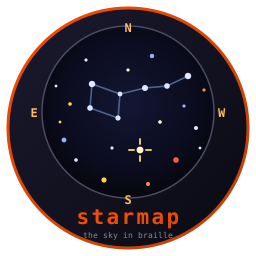
The naked-eye sky in braille: 9,096 stars from the Yale Bright Star Catalogue with Hipparcos distances, the constellation figures, the sky over your head or the celestial sphere as a map, and a picker you walk with a crosshair. Drives astro's chart and stars' sky.
Sparklines, line charts, candlestick charts, and bar charts rendered with Unicode block / braille characters and ANSI colors. Pure Rust, zero runtime dependencies.
The parts of reading mail that are pure logic: quoted-printable,
base64, RFC 2047 headers, the multipart walk that finds the
readable part, HTML mail reduced to text, and which messages
have been read, merged across devices. Shared by kastrup and the
nomad mail app. Published as fe2o3-mail.
RSS and Atom turned into entries, with no I/O: give it the XML,
get back the items. Deliberately not a strict XML parser, because
feeds in the wild are not strict XML. Shared by kastrup and the
nomad phone app. Published as fe2o3-feed.
An embedded SQL database that keeps its tables in memory, with
a log and a snapshot on disk. Five times SQLite on reads and
ahead on writes, measured on the same disk in the same mode;
killed mid-write 10,000 times without losing a committed row.
The comparison.
Published as fe2o3-ferrite.
A game engine for the terminal. A game draws pixels into a frame; funkey shows it two pixels a cell in full colour, or as real pixels where the terminal has them, reads held keys, and runs the loop at a fixed rate. Sprites, tile maps, platformer physics, sound, a 3D rasterizer and a Doom renderer come with it. The games on it: a Jumpman Junior kind of game, Space Invaders, a car over the hills, a flight over fractal mountains, a walk to a castle, and Doom itself from any Doom WAD. They have their own page: isene.org/funkey.
The RPN / XRPN engine behind rpnx and the RPNx phone app: an
HP-41 style stack, the full command set and a FOCAL program
runner, with no I/O. One engine, two frontends, identical
results. Published as fe2o3-rpnx-core.
nomad is the mobile half of the family: a single Android monorepo with a shared Rust core (the same logic as the desktop, via UniFFI) under thin Kotlin / Compose shells. Each app carries one Fe2O3 workflow off the laptop and syncs over Syncthing, with no Google account and no cloud middleman.
HyperList todo editor + Glance home-screen widget for the same
~/.tasks/todo.hl that scribe edits and kastrup's
z triage appends to.

General HyperList editor: full syntax highlighting, fold, drag-reorder across depth, and auto-renumber.
Notification gateway: relays WhatsApp / Messenger / Instagram / SMS / Discord (and photos) into kastrup and fires replies, replacing the laptop's Marionette bridge.
Amateur-astronomy companion: ephemeris, met.no weather + observing conditions, in-the-sky events, APOD, starchart, and a telescope/eyepiece gear catalog (shared with desktop astro).
TMDB movie / series browser: top-rated & popular lists, your own wish/dump lists, posters, full detail, and search-to-add.
Amar RPG O6 dice roller: D6, skill, and combat rolls with the full crit/fumble tables, plus fear rolls with mental-fortitude.
Pocket HP-41 RPN scientific calculator: full stack/registers/modes, an HP-41-style multi-shift keypad, and a FOCAL program runner. Same Rust engine as the rpnx terminal calculator.
Distraction-free notes pad, the touch companion to the scribe editor, syncing the same plain-text notes over Syncthing.
Offline, searchable reference reader: glossaries, books, and your own writings in your pocket, with no network needed.
Voice quick-capture: hold, talk, and file a transcribed note; the
pocket version of the laptop's Win+a VTT.
Reader for your personal daily news digest: browse the last 7 daily
issues (and the typeset PDF) synced into ~/.news, open
source links. Touch companion to the gazette TUI.
The library on your phone. Read-only reader over the synced
~/.library: only the books you have made, grouped by
shelf, with inline figures and spoken tracks, read full-screen
and offline.
A minimal home-screen launcher: one screen, your widgets placed freely, and your apps in a panel that comes up on a swipe, also inside other apps. A bank app that refuses to run beside the swipe gets it switched off while it runs. Built to cost nothing when idle, no polling or background wake-ups.
Your Gmail inboxes and RSS feeds on the phone, decoded by the same crates kastrup uses. Headers on sync, bodies on open. The laptop stays authoritative: opening a message here changes nothing, only an explicit Mark READ does, and that reaches the laptop too.
A web browser around Android's WebView. Tabs travel to and from the laptop, and it reads the laptop's encrypted passwords and bookmarks. Ad blocking and dark pages come built in.
Every app you installed, newest first. Tap one to open it; long-press for app info or to uninstall.
A file manager. Tag what you want, walk to where it should go, and copy or move it there. Nothing is overwritten, a delete goes to the trash, and every step can be taken back. Tabs, archives that open as folders, and search inside files. Other apps save straight into your marked folders.
The calendars your phone already keeps in sync, as a month with dots for each day's events and an agenda below it. A widget lists the coming 30 days. Make, change and delete events, and get their reminders. Each calendar can take the colour it has in tock on the laptop.
Two colours side by side, set with R, G, B and H, S, V sliders or six hex digits, over sample text with their contrast and WCAG level. Copy a colour as hex, rgb or hsv. No permissions and no network.
A buzz when a Claude Code session on the laptop finishes, with the first line of its answer. The list shows each session's state, its last answer and the questions it left for you: answer them with a tap, write back, or drop one you answered on the laptop. It talks to a fleet server of your own.
Archived: nova and scope have been folded into astro; hyper has been folded into scribe.
Each tool ships multi-platform prebuilt binaries on every tagged
release. Grab the launcher, then press I and it fetches
every app you do not have:
curl -L "https://github.com/isene/fe2o3/releases/latest/download/fe2o3-linux-x86_64" \
  -o ~/bin/fe2o3 && chmod +x ~/bin/fe2o3
fe2o3          # then press I

# Other platforms: replace -linux-x86_64 with:
#   -linux-aarch64  (Raspberry Pi, ARM64 Linux)
#   -macos-x86_64   (Intel Mac)
#   -macos-aarch64  (Apple Silicon)
Or take them straight from the shell:
for app in pointer kastrup scribe folio scroll gazette tock astro watchit torii \
    prism fonts drain amar tune melody petri library grid viewer rpnx typo fleet \
    hl2web beam yank moon stars exoplanets gambit alchemy gaze hush roam launch \
    herald elements isotopes particles circuit fractal universe; do
  curl -L "https://github.com/isene/$app/releases/latest/download/$app-linux-x86_64" \
    -o ~/bin/$app && chmod +x ~/bin/$app
done